How to read data from Excel file using Java code and POI API
1. We should know what all packages we need to import
Java.io.file
POI
org.apache.poi.xssf.usermodel.XSSFWorkbook; - Create workbook object
org.apache.poi.xssf.usermodel.XSSFSheet; - Create particular sheet object to access specific sheet in workbook
org.apache.poi.xssf.usermodel.XSSFCell; -
org.apache.poi.xssf.usermodel.XSSFRow; -
2. We should know what all objects we need to create to read the excel file
FileInputStream f = new FileInputStream(new File(String path));
XSSFWorkbook w= new XSSFWorkbook(f); // Creating object for the workbook
XSSFSheet s= w.getSheet(String sheetname); // Creating object for the specific sheet based on the sheet name
3. Accessing Rows and Columns
startRow= sheet.getFirstRowNum();
endRow=sheet.getLastRowNum();
startCol=sheet.getRow(0).getFirstCellNum(); // getFirstCellNum() Method belongs to XSSFRow class
endCol=sheet.getRow(0).getLastCellNum(); Note- getLastCellNum() Gets the index of the last cell contained in this row PLUS ONE.
4. Accessing from a cell
s.getRow(int i).getCell(int cellNum).getStringCellValue() // getStringCellValue() is method of XSSFCell class. It returns value from a cell
Note- There is a overloaded method getCell(int cellnum, Row.MissingCellPolicy policy) too, which is useful to handle blank cells. e.g. getCell(int j, Row.CREATE_NULL_AS_BLANK) will return blank if the cell is null. Sometimes null cells throws exceptions.
Full program is below
public static String[][] readExcelData(String module)
{
String path="H:\\Technical\\Selenium\\Workspace\\NavigatorSIT\\NavigatorPackages\\Resources\\Data\\data1.xlsx";
String[][] tabArray=null;
FileInputStream fis = null;
int startRow,startCol, endRow, endCol,ci=0,cj;
try
{
fis = new FileInputStream(new File(path));
XSSFWorkbook workbook = new XSSFWorkbook(fis);
XSSFSheet sheet = workbook.getSheet(module);
/*---[Start] Identifying the rows an columns in module sheet---*/
startRow= sheet.getFirstRowNum();
endRow=sheet.getLastRowNum();
startCol=sheet.getRow(0).getFirstCellNum();
// getLastCellNum() Gets the index of the last cell contained in this row PLUS ONE.
endCol=sheet.getRow(0).getLastCellNum();
/*---[End] Identifying the rows and columns in Main sheet---*/
/*System.out.println("StartRow " + startRow + " EndRow " + endRow +
" startCol " + startCol + " endCol " + endCol);*/
tabArray=new String[endRow-startRow][endCol-startCol];
for(int i=startRow+1;i<=endRow;i++)
{
cj=0;
for (int j=startCol;j<endCol;j++,cj++)
{
tabArray[ci][cj]=sheet.getRow(i).getCell(j, Row.CREATE_NULL_AS_BLANK).getStringCellValue();
if(tabArray[ci][cj].equalsIgnoreCase(""))
tabArray[ci][cj]="null";
// System.out.println(tabArray[ci][cj]);
}
ci++;
}
}
catch (Exception e)
{
System.out.println(e.toString());
}
return(tabArray);
}
Thursday, September 25, 2014

Wednesday, September 24, 2014
Eclipse configuration
1. Adding existing project folders to the project explorer in eclipse
File->Import->General->Existing Projects Into Workspace->Select root directory of project->Finish
More Info
http://stackoverflow.com/questions/3924229/adding-existing-project-folders-to-the-project-explorer-in-eclipseMore Info
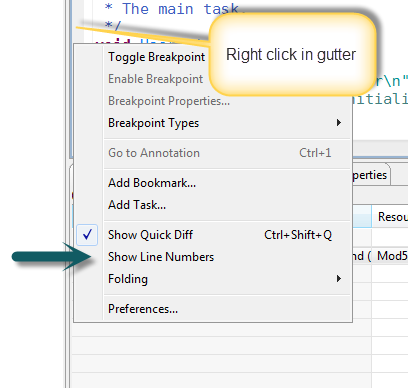
2. Configuring Eclipse line numbers
Window -> Preferences -> General -> Editors -> Text Editors -> Check the Show line numbers check box.
OR
Subscribe to:
Comments (Atom)